
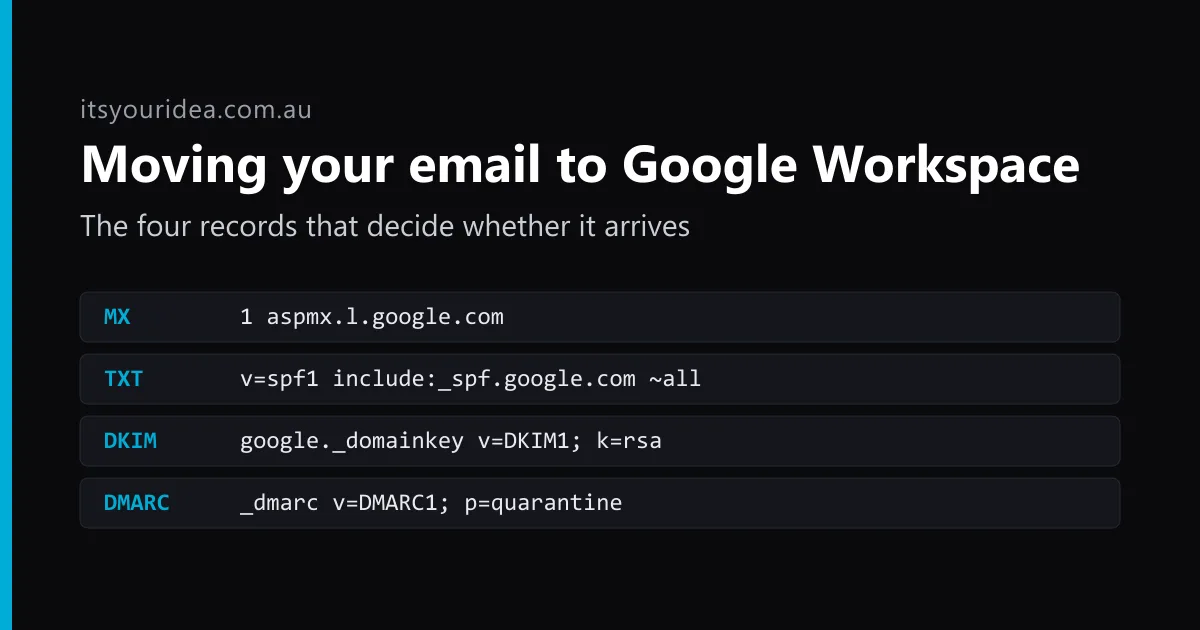
Our own email runs on Google Workspace, and has for long enough that our mail records still use the server names Google gave customers before 2023. Workspace itself rarely goes wrong. Moving a business onto it is where the trouble is. These are the five problems we'd check for before anyone switches, and the records our own domain publishes, so you can compare them with yours.
First, what you're actually buying
Google Workspace is Gmail, Calendar, Drive, Meet and the rest, running on your own domain instead of an @gmail.com address. On Google's Australian pricing page on 17 November 2026, the three Business plans were:
- Business Starter: A$9.90 per user per month, with 30 GB of storage per user, pooled across the business.
- Business Standard: A$19.80, with 2 TB per user and meeting recording.
- Business Plus: A$30.90, with 5 TB per user and Vault for keeping and searching records.
Those are one-year-commitment prices before GST. Month to month costs more, and Google runs its own offers, so check the page on the day. For most small businesses, Starter is enough. The usual reason to go up a plan is storage, because 30 GB disappears quickly once a team saves site photos or plans into Drive.
Five things that go wrong when a business moves its email
1. The old mail stays behind
Pointing your domain at Google sends new mail to Workspace. It does nothing about the years of mail sitting with your old provider. If that provider is your web host, the old mailboxes often disappear when the hosting is cancelled, and nobody notices until someone goes looking for a quote from 2023. Copy the old mail across before the switch, then run a final pass afterwards to catch anything that arrived in between.
2. Your website's emails start landing in spam
This is the most common one, and the easiest to miss. Your contact form, your invoicing tool and your booking system all send mail that claims to come from your domain. SPF is the DNS record that lists who's allowed to do that. When a business moves to Workspace, the new SPF record usually lists Google and nothing else, and every other sender suddenly looks like a forgery. Enquiries go to spam, or vanish. Before you switch, list every tool that sends mail as you. Our own SPF record has two entries for exactly that reason: Google, and one other service that sends mail as us.
3. DKIM is never switched on
DKIM puts a signature on each message so the receiving server can tell it really came from you. In Workspace, it isn't automatic for most domains. Google's own instructions have the admin generate a key, publish it as a DNS record, and then press "Start authentication". It's an easy step to miss, because mail still flows without it, just with less trust behind it. Google recommends a 2048-bit key.
It matters more than it used to. Since February 2024, Gmail's sender guidelines require every sender to use SPF or DKIM. Anyone sending more than 5,000 messages a day to Gmail addresses needs both, plus DMARC. A small business won't hit that number, but the receiving servers judge your mail on the same signals either way.
4. Paying for addresses instead of people
Workspace charges per user, so creating a full account for info@, accounts@ and bookings@ triples the bill for no gain. A shared address can be a group that delivers to whoever needs it, or an alias on an existing account. Neither needs a paid licence. You pay for people, not addresses.
5. Deleting a leaver's account deletes their mail
When someone leaves, the tempting fix is to delete their account and stop paying for it. Google keeps a deleted account for 20 days. After that, the email and the files they owned are gone for good. Transfer their mail and Drive files to someone else first, or keep the account on Google's cheaper Archived User licence if you need it for records. Files in shared drives belong to the business, so they stay put.
Our own records, as an example
Anyone can look these up, so here's what itsyouridea.com.au publishes today, trimmed for length:
MX     1  aspmx.l.google.com  (plus four alt servers)
TXT       v=spf1 include:_spf.google.com include:[one other sender] ~all
google._domainkey   TXT  v=DKIM1; k=rsa; p=[public key]
_dmarc    TXT  v=DMARC1; p=quarantine; rua=[our report address]
Three things are worth noticing. The MX records are the older multi-server set. Google now gives new customers a single record, smtp.google.com at priority 1, and says the older set keeps working, so there's no reason to touch a setup that works. DKIM is published. And our DMARC policy is quarantine, which tells receiving servers to treat mail that fails the checks as suspect instead of delivering it. A DMARC record set to p=none only reports. It's the right place to start, but it's easy to leave it there for good.
You can check your own domain with any free DNS lookup tool. If there's no DKIM record, no DMARC record, or an SPF record that only mentions one service while three tools send your mail, that's where to start.
If you'd rather someone else did it
This is the work we do when a business moves to Workspace: copy first, switch second, then check that every sender still gets through, the website's contact form included. After that we look after the accounts as people start and leave. We're also a Google Workspace referral partner, so we can give you a code for 10% off your first year on Starter, Standard or Plus. Google bills you directly and may pay us a referral fee, which doesn't change what you pay. How we set up and manage Google Workspace →
Moving your email to Google Workspace?
Google Workspace setup and management →